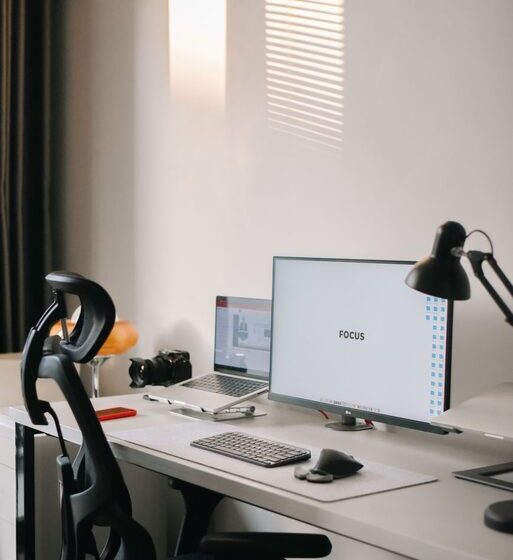

Creating an organized and clutter-free home workspace is essential for staying focused and productive. Whether you work remotely full-time or occasionally, having a designated area that inspires creativity and efficiency can make a big difference. In this post, we’ll explore practical tips to help you arrange your home office in a way that promotes productivity while keeping distractions and clutter to a minimum.
Why an Organized Workspace Matters
A messy workspace can increase stress and reduce your ability to concentrate. On the other hand, a clear and well-arranged desk encourages better workflow and motivation. Organizing your workspace isn’t just about neatness—it’s about creating an environment that supports your work habits and goals.
—
Step 1: Choose the Right Location
Consider Natural Light and Comfort
Pick a spot in your home with good natural lighting. Natural light can help reduce eye strain and improve your mood throughout the day. Avoid areas with excessive noise or foot traffic to minimize distractions.
Ergonomics Matter
Make sure the space you pick allows you to set up your desk and chair comfortably. Your chair should support your back, and your desk height should keep your arms at a comfortable angle to avoid strain.
—
Step 2: Declutter Regularly
Sort and Purge
Start by removing everything from your workspace. Sort through your items and decide what to keep, donate, or discard. Only keep tools and materials you use regularly.
Establish Daily Decluttering
Make it a habit to tidy your desk at the end of each day. Wipe the surface, organize papers, and put away any unnecessary items. This keeps clutter from building up and prepares you for the next day.
—
Step 3: Use Smart Storage Solutions
Desk Organizers and Containers
Use drawer dividers, trays, or containers to separate supplies like pens, paperclips, and sticky notes. This makes it easier to find what you need quickly.
Shelves and Filing Systems
Install shelves to store books or binders and set up a filing system for papers and documents. Label files clearly so you can retrieve them without hassle.
—
Step 4: Optimize Your Desk Setup
Keep Essentials Within Reach
Place frequently used items such as your computer, phone, and notepad close by. Avoid overcrowding your desk with gadgets that are not necessary.
Limit Decorations
While it’s good to personalize your space, too many decorations can create visual clutter. Choose a few meaningful items like a plant or a photo frame to keep your workspace pleasant without overwhelming.
—
Step 5: Manage Digital Clutter
Organize Your Digital Files
Just as a messy physical desk can distract you, so can an unorganized computer desktop. Create folders and name files clearly. Delete or archive old documents regularly.
Use Productivity Tools
Apps like task managers, calendar planners, and note-taking tools streamline your work and reduce paper piles.
—
Step 6: Create a Routine and Boundaries
Set Work Hours
Define specific work hours to maintain balance between personal and professional time, especially when working from home.
Take Breaks Away From Your Desk
Step away periodically to refresh your mind. Avoid eating meals at your workspace to keep it clean and separate from relaxation areas.
—
Bonus Tips for Maintaining Your Workspace
– Cable Management: Use clips or cable sleeves to keep cords untangled and out of sight.
– Regular Deep Cleaning: Schedule time weekly or monthly to clean surfaces, keyboard, and office equipment.
– Adjust as Needed: Your workspace should evolve with your work style. Be open to rearranging furniture or changing procedures if your current setup isn’t effective.
—
Conclusion
A clutter-free and organized home workspace encourages productivity by reducing distractions and fostering focus. By choosing the right location, maintaining regular decluttering habits, investing in smart storage, managing digital files, and setting clear boundaries, you’ll create a space that not only looks good but helps you work smarter. Start small and make gradual improvements for lasting results.
—
Feel free to share your own tips and setups in the comments below!